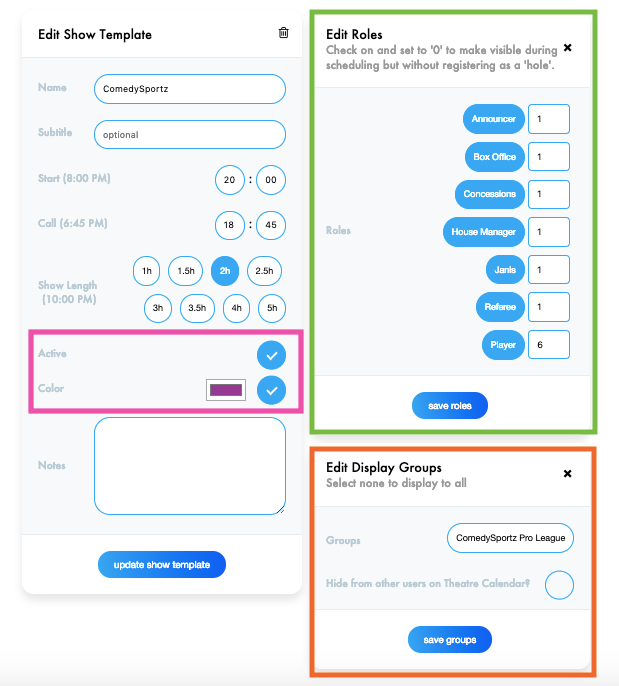
Show Templates allow you to create templates for commonly performed shows. You can apply show templates to both single and recurring events.
- Go to Manage > Show Templates
- Click "New"
- Enter Show Details
- Click "Create Show Template". You will be able to add more details on the next page.
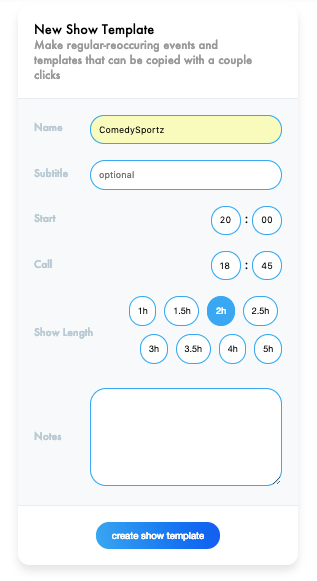
- Add Additional Show Details
- Edit Show Template Module
- If you want the show to display on the calendar, check "Active"
- To change the event display color, click the circle and then click the color box to change the color.
- Edit Roles Module
- Click on the Role Name to activate it for a particular event. It will turn blue once it is active. From there, select how many of each role you need for the specific show (i.e. on referee and six players).
- Edit Display Groups
- If this event only applies to a specific group, click the "plus" icon and choose which groups you want to be able to submit availability.
- Users who are not in the display group can still see the event, however, they cannot mark themselves available. If you would like to hide the event from any users not in the chosen display groups, click "Hide from other users on Theatre Calendar?"
- Edit Show Template Module