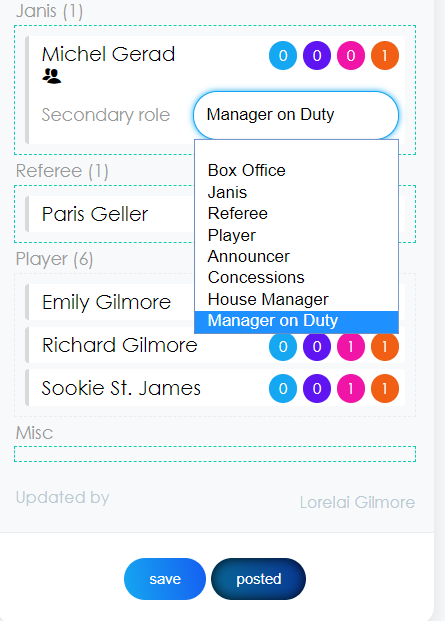
When creating your schedule, you are able to add assign a secondary role to a user (i.e. Manager on Duty).
Creating Secondary Roles
- Manage>Roles & Groups
- Click "New"
- Enter Role Details
- Name: Position Name
- Skilled: Does the position require a certain trained skillset (i.e Manager on Duty)? Then check "Skilled" and only qualified users will show up when scheduling.
- Display Order
- Secondary Role: Check this box if you only want this role to be available as a secondary role. This will require the user to be assigned to another role before the secondary role can be added.
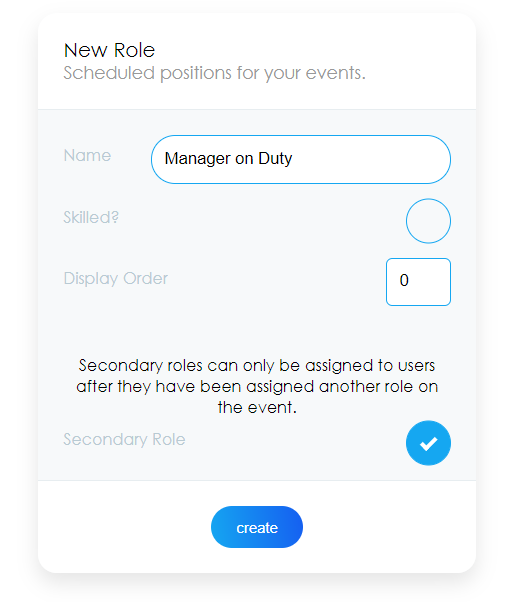
- Click Create
Assigning Secondary Role
- Double click on the user's name
- The "
 "icon will display
 - Click the drop down for the appropriate secondary role
- Click "Save"